

A home lab does not need a rack of noisy servers to be useful. One Mini PC is enough to walk the full ZSvirt lifecycle: bring up the management node, add a KVM host, attach storage and networking, create a virtual machine, and prove the whole chain works.
The important qualifier is single-node. In this build, the Mini PC is both the ZSvirt management node and the compute host. That makes the lab inexpensive and quiet to run, but it also means one physical failure domain. It is a serious place to learn platform operations — not a substitute for a resilient production cluster.
What a single-node ZSvirt lab can verify
The value of this lab is the complete resource chain, from the management plane down to a guest operating system.
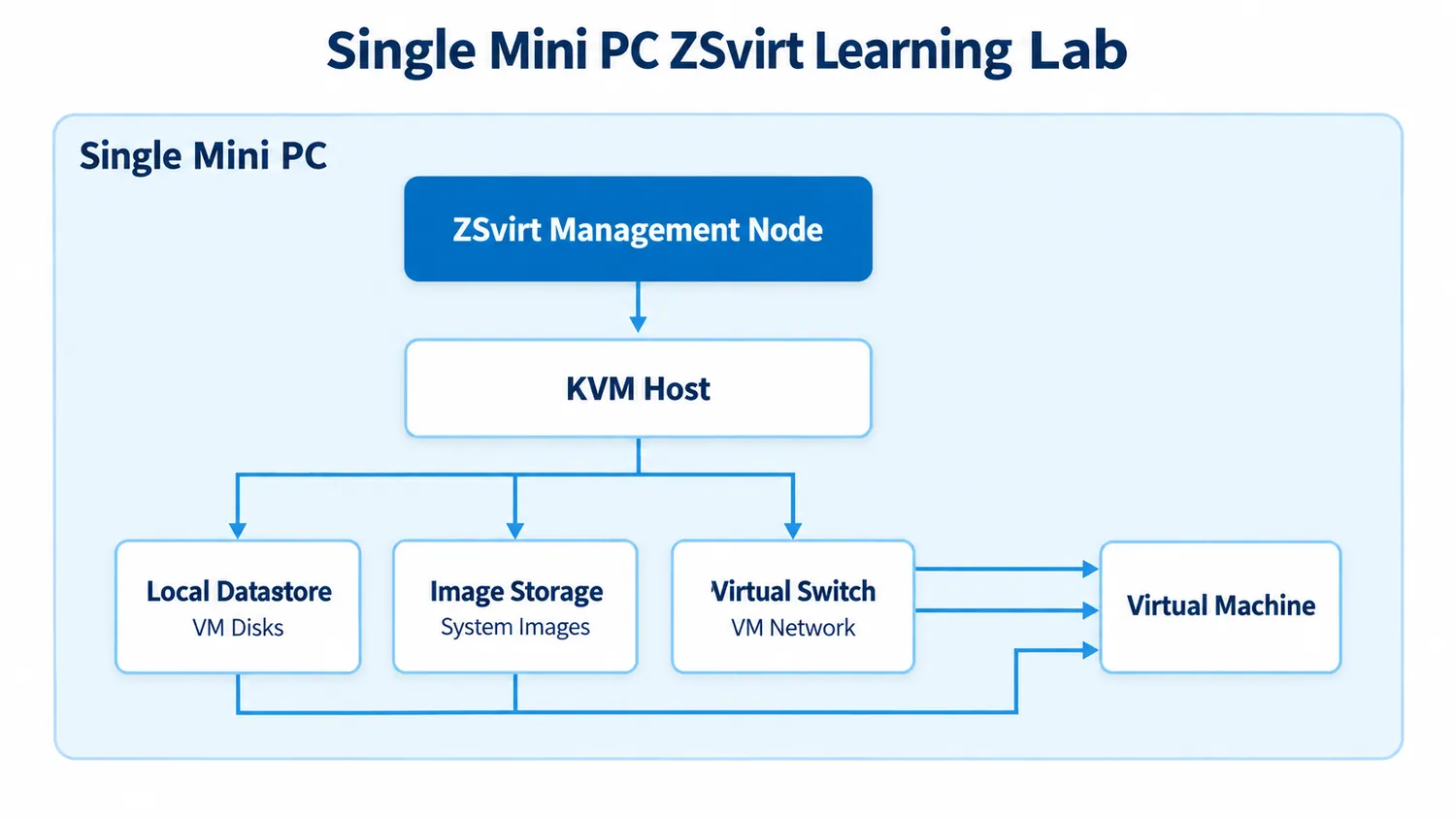
Once a VM boots from an image, receives an address, reaches its gateway, and resolves DNS, you have verified far more than a successful installation. You have tested the management plane, the compute host, storage, the virtual network, and the guest operating system together.
There is one hard limit to be clear about. A local datastore is fine for single-host verification, but it cannot be used to test cross-host migration — that needs a second host and shared storage. ZSvirt’s Quick Start draws the same line.
Mini PC hardware requirements for a ZSvirt lab
Start with an x86_64 Mini PC that exposes Intel VT-x or AMD-V, has wired Ethernet, and can take more memory or storage later.
| Item | Minimum | Recommended |
|---|---|---|
| CPU | 8 cores with Intel VT-x or AMD-V | 24 cores or more |
| Memory | 8 GB | 24 GB or more |
| System disk | 100 GB | 200 GB or more |
The minimum for a single-node ZSvirt lab is an x86_64 machine with Intel VT-x or AMD-V, 8 CPU cores, 8 GB of memory, and a 100 GB system disk. Both columns come from the official All-in-One requirements, which are sized so that one node can also carry production workloads. A home lab sits closer to the minimum: a Mini PC with 8–16 cores, 32 GB of memory, and a 1 TB NVMe drive runs several small guests comfortably, and the larger disk is what keeps guest images and snapshots from competing for space.
Two firmware settings are worth five minutes before installing: enable hardware virtualization, and, if the machine supports it, set the system to restore power after an outage.
Use a static management address from the first installation. The management node IP is written into the platform configuration at install time, so DHCP is not recommended — a hypervisor that moves after a lease change is awkward to manage. Set the clock as well, ideally against NTP: if the node’s time predates the package build time, the install script can fail.
Setting up the smallest complete ZSvirt lab
Download the current ZSvirt 1.0.0 ISO from the ZSvirt download page, verify its checksum, and install the management-node mode on the Mini PC. The installer asks for a system disk, a static IPv4 address, and a root password, and takes roughly ten minutes.
After the first boot, confirm that the management node and the Web UI are running. The console status display reports both; from the command line:
zstack-ctl statusNote: low-level command and API names still use legacy fields such as
zstack-ctl. These are command-layer names and do not affect platform operations.
Then create only the resources needed to reach one working VM, in this order:
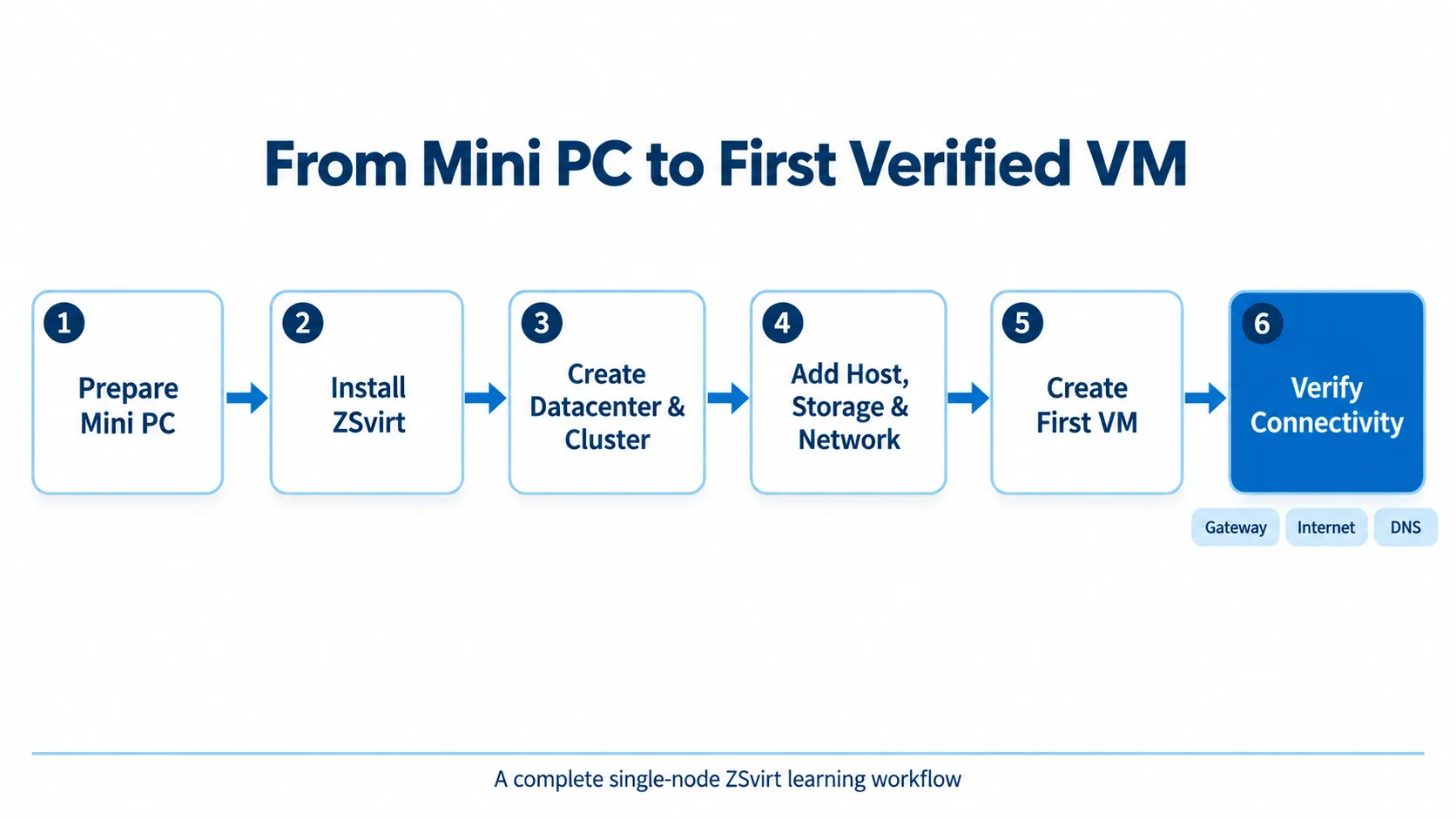
- Initialize the datacenter and cluster;
- Add the host — this same machine;
- Add a local datastore with a mount path;
- Add image storage as a local directory;
- Add a system image;
- Create a distributed switch and a distributed port group;
- Create the VM, attach the image to disk 1, select NIC 1, and power it on.
Keep names simple: home-dc, mini-cluster, mini-01, probe-01. This is a lab, not a naming contest, and clear names make troubleshooting much faster.
For the first network, one wired NIC and one simple guest subnet are enough. Reserve a guest address range that does not overlap your existing DHCP service, since ZSvirt assigns VM addresses itself. Add VLANs only after the basic lab works, because the physical switch has to be configured to match the virtual network before the VLAN will pass traffic.
How to verify the lab works
Do not stop when the dashboard says Running. Open the guest console and run:
ip addr
ip route
ping -c 4 <gateway-ip>
ping -c 4 1.1.1.1
ping -c 4 example.com
Each result says something different:
| Result | What it tells you |
|---|---|
| Gateway reachable | The port group, address allocation, and routing are likely correct |
| Public IP reachable | The upstream path works |
| Hostname resolves | DNS works |
| A step fails | The last successful step shows where the chain broke |
This is the right finish line for a first lab. It is repeatable, observable, and follows the same validation path as the official documentation.
When a single node is no longer enough
After the first VM works, add two more small Linux guests: one running a lightweight service, and one deliberately built to be broken and rebuilt. Watch memory use, disk capacity, temperature, fan noise, and power draw while all three are running.
The first constraint is usually not CPU. It is more often RAM, storage capacity, or the fact that every workload and every backup still depends on one physical machine. Treat snapshots as a convenience, not as a backup. Anything that matters should be copied to another physical drive or a NAS, and at least one restore should be tested.
You have outgrown the one-box lab when you need to test migration, run services that cannot tolerate downtime, or separate management, storage, and workload traffic. At that point, add a second Mini PC and shared storage rather than overloading the first one.
What a single-node lab cannot do
A single Mini PC cannot demonstrate high availability. It can, however, teach the platform model behind it: how hosts, images, storage, networks, and VMs fit together — and how to prove that they work.
That is enough to make it a serious ZSvirt learning lab.
What’s Next
- Download ZSvirt and start with the Quick Start path;
- Follow the step-by-step first-VM tutorial;
- Evaluating ZSvirt as a VMware alternative? Work through the PoC guide.
- Source code: https://github.com/zsvirt/zsvirt
- Download Center: https://zsvirt.io/download
- Documentation Center: https://zsvirt.io/en/docs
Join the Community
- Issue reports: GitHub Issues
- Community discussions: GitHub Discussions
- Social media:
- YouTube: https://youtube.com/@ZSvirt
- LinkedIn: https://www.linkedin.com/in/zsvirt-community/
- X/Twitter: https://x.com/ZSvirt
- Discord: https://discord.com/invite/KHsw63z9xA
- Email: community@zsvirt.io